![未标题-1-01.png]](https://support.hypersku.com/hs-fs/hubfs/%E6%9C%AA%E6%A0%87%E9%A2%98-1-01.png?height=50&name=%E6%9C%AA%E6%A0%87%E9%A2%98-1-01.png)
What Etsy Sellers Need to Do
Step 1: Create a HyperSKU Account
If you haven't already, register your HyperSKU account using this Registration Link to get started.
Step 2: Connect Your Etsy Store
To connect your store, please follow our detailed guide here: How to Connect Your Etsy Shop to HyperSKU.
Alternatively, you can connect it directly by following these steps:
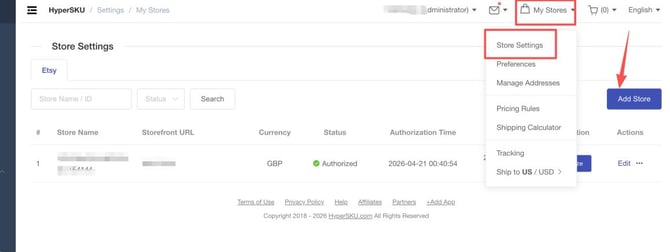
- Log in to your HyperSKU dashboard.
- In the upper right corner, click on My Stores and select Store Settings.
- Click the Add Store button on the right, select Etsy, and follow the prompts to authorize the connection.
Step 3: Configure Your Tracking Settings
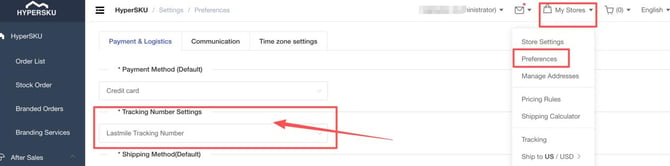
To ensure the correct tracking information is synced back to your Etsy customers, update your preferences:
- Go to My Stores in the upper right menu, and click on Preferences.
- Locate the Tracking Number Settings section.
- Select Last Mile Tracking Number as your default setting.
How HyperSKU Fulfills Your Orders
Once your store is connected, HyperSKU handles the rest of the heavy lifting. Here is how our automated fulfillment workflow works:
1. Automatic Order Syncing
After successful store connection, our system will automatically sync your incoming Etsy orders.
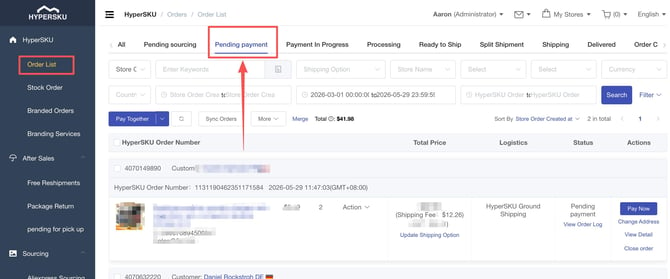
- Synced orders will appear under Order List > Pending Payment status in your HyperSKU dashboard, ready for you to review and pay.
2. Fast Processing & Quality Check
- Once payment is completed, we will begin processing your orders immediately.
- Processing Time: Standard processing typically takes 2 to 3 business days.
- Quality Control: Once the products arrive at our warehouse, our dedicated team conducts a thorough double-check of the items to ensure quality before they are packed and shipped.
3. Last-Mile Tracking Sync
- As soon as your package leaves our warehouse and is received by the shipping carrier, a last-mile tracking number is generated.
- This tracking number will automatically sync back to your Etsy store to notify your customers.
- Total Timeframe: From the moment you pay for an order to the generation of the last-mile tracking, the entire process usually takes about 4 to 5 days.
Important Tips & Best Practices
To ensure a smooth fulfillment experience, please keep the following recommendations in mind:
- Manual Order Creation (Privacy Sync Delay): Due to Etsy’s strict privacy policies, some orders may occasionally experience a sync delay. If you notice an order has not synced to HyperSKU, please contact your account manager and provide the following details: Store Name, Order Number, Product Link/Image, and Shipping Address. We will manually create the order for you to avoid shipping delays.
- Adjust Your Etsy Processing Time: To allow sufficient time for product sourcing, quality checks, and shipping, we highly recommend setting your Etsy store’s processing time to 1 to 7 days. This helps prevent orders from being marked as overdue on Etsy.
- Consolidation Note: Because Etsy stores offer a highly diverse range of product categories, consolidating suppliers under a single shipment is not always feasible, which may occasionally cause minor variations in shipping times. Rest assured, our team conducts daily audits on all order statuses to actively monitor, identify, and resolve any potential delays immediately.
Need More Help?
If you have any questions or need further assistance during the setup, please do not hesitate to reach out to your dedicated HyperSKU agent. We are here to support you every step of the way!