![未标题-1-01.png]](https://support.hypersku.com/hs-fs/hubfs/%E6%9C%AA%E6%A0%87%E9%A2%98-1-01.png?height=50&name=%E6%9C%AA%E6%A0%87%E9%A2%98-1-01.png)
If you have inventory that is no longer needed, you can submit a destruction request directly through the HyperSKU App.
Once the destruction process is completed, the destroyed inventory will no longer be included in future storage fee calculations.
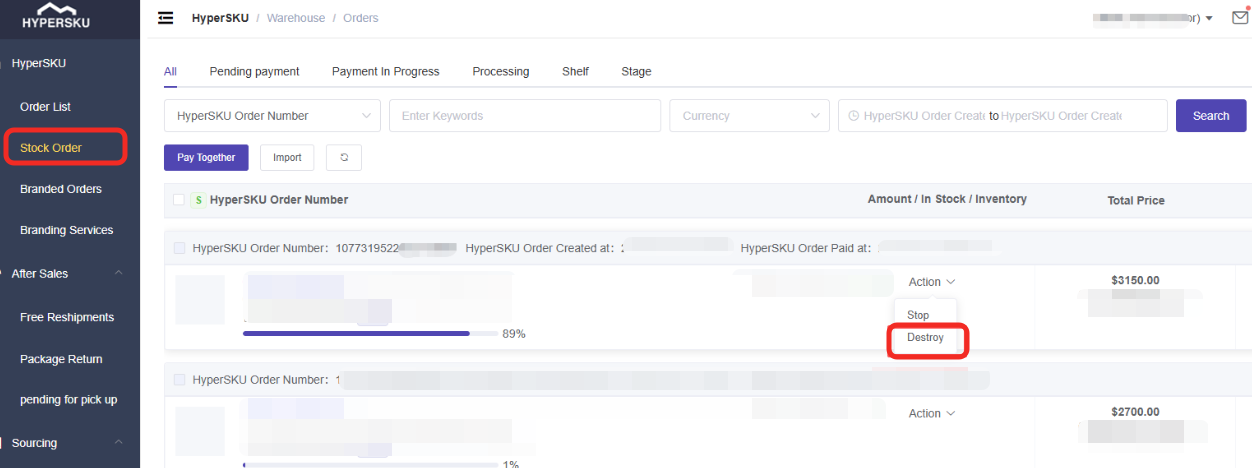
How to Submit an Inventory Destruction Request
Follow these steps:
- Log in to your HyperSKU App
- Go to Stock Orders
- Click Action
- Select Destroy and submit your request
Important Notes
- Please confirm the inventory details before submitting a destruction request.
- Destroyed inventory cannot be restored after completion.
- Storage fees will continue to apply to inventory that remains in storage.